
Appearance
什么是 SSE 流式传输
SSE 全称为 Server-sent events , 是一种基于 HTTP 协议的通信技术,允许服务器主动向客户端(通常是Web浏览器)发送更新。 它是 HTML5 标准的一部分,设计初衷是用来建立一个单向的服务器到客户端连接,使得服务器可以实时地向客户端发送数据。
这种服务端实时向客户端发送数据的传输方式,其实就是流式传输。
SSE 技术原理
参数设置
前文说到,SSE 本质是一个基于 http 协议的通信技术。
因此想要使用 SSE 技术构建需要服务器实时推送信息到客户端的连接,只需要将传统的 http 响应头的 contentType 设置为 text/event-stream 。
并且为了保证客户端展示的是最新数据,需要将 Cache-Control 设置为 no-cache 。
在此基础上,SSE 本质是一个 TCP 连接,因此为了保证 SSE 的持续开启,需要将 Connection 设置为 keep-alive 。
js
Content-Type: text/event-stream
Cache-Control: no-cache
Connection: keep-alive
demo
后端代码
js
const express = require('express');
const app = express();
const PORT = 3000;

app.use(express.static('public'));

app.get('/events', function(req, res) {
    res.setHeader('Content-Type', 'text/event-stream');
    res.setHeader('Cache-Control', 'no-cache');
    res.setHeader('Connection', 'keep-alive');

    let startTime = Date.now();

    const sendEvent = () => {
        // 检查是否已经发送了10秒
        if (Date.now() - startTime >= 10000) {
            res.write('event: close\ndata: {}\n\n'); // 发送一个特殊事件通知客户端关闭
            res.end(); // 关闭连接
            return;
        }

        const data = { message: 'Hello World', timestamp: new Date() };
        res.write(`data: ${JSON.stringify(data)}\n\n`);

        // 每隔2秒发送一次消息
        setTimeout(sendEvent, 2000);
    };

    sendEvent();
});

app.listen(PORT, () => {
    console.log(`Server running on http://localhost:${PORT}`);
});
前端代码
public/index.html
html
<!DOCTYPE html>
<html lang="en">

<head>
    <meta charset="UTF-8">
    <title>SSE Example</title>
</head>

<body>
    <h1>Server-Sent Events Example</h1>
    <div id="messages"></div>

    <script>
        const evtSource = new EventSource('/events');
        const messages = document.getElementById('messages');

        evtSource.onmessage = function(event) {
            const newElement = document.createElement("p");
            const eventObject = JSON.parse(event.data);
            newElement.textContent = "Message: " + eventObject.message + " at " + eventObject.timestamp;
            messages.appendChild(newElement);
        };
    </script>
</body>
</html>
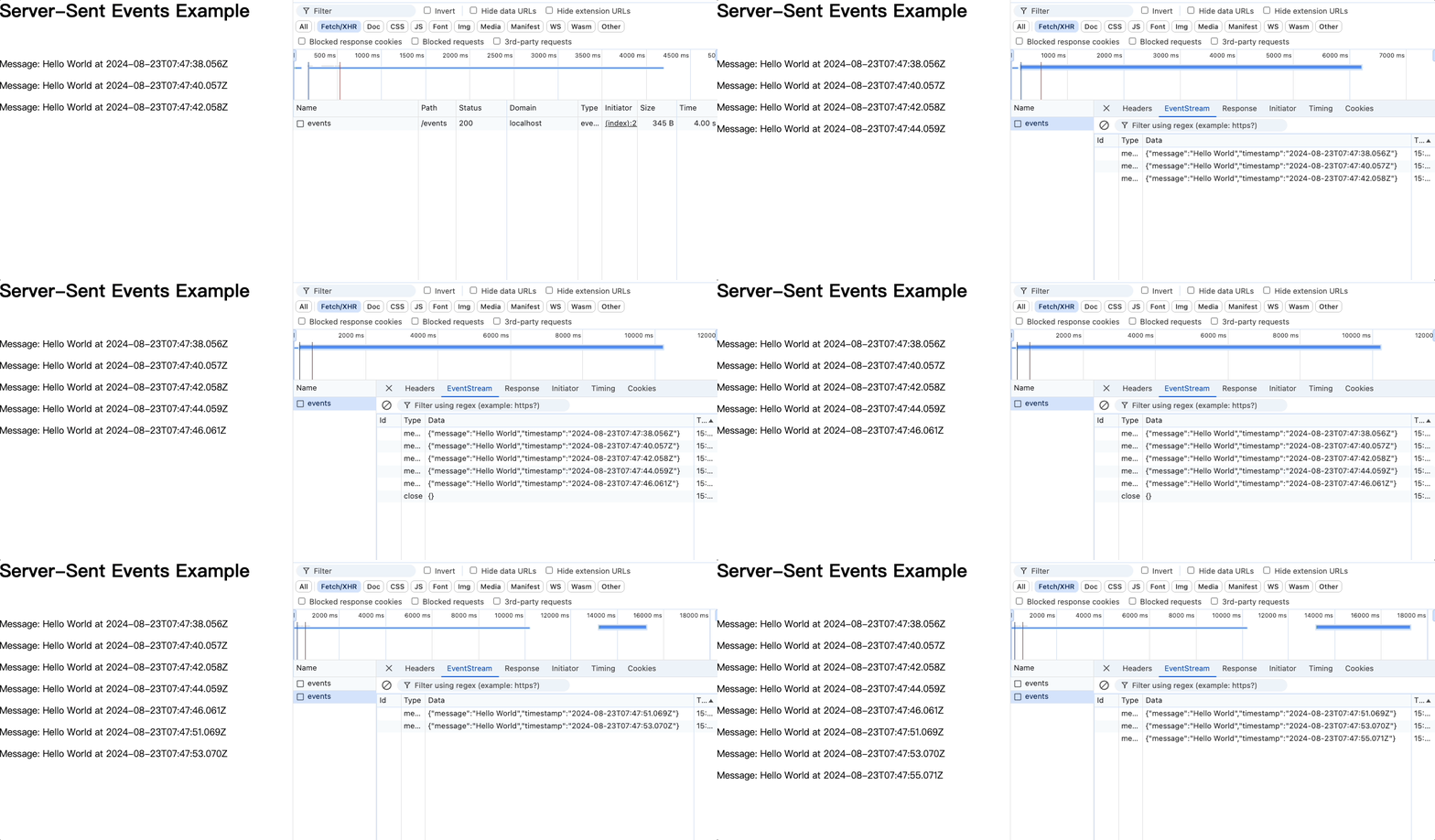
当我们在浏览器中访问运行在 localhost: 3000 端口的客户端页面时,页面将会以 流式模式 逐步渲染服务端返回的结果:
需要注意的是,为了保证使用 SSE 通信协议传输的数据能被客户端正确的接收,服务端和客户端在发送数据和接收数据应该遵循以下规范:
服务端基本响应格式
SSE 响应主要由一系列以两个换行符分隔的事件组成。每个事件可以包含以下字段:
text
data:事件的数据。如果数据跨越多行,每行都应该以data:开始。
id:事件的唯一标识符。客户端可以使用这个ID来恢复事件流。
event:自定义事件类型。客户端可以根据不同的事件类型来执行不同的操作。
retry:建议的重新连接时间(毫秒)。如果连接中断,客户端将等待这段时间后尝试重新连接。
字段之间用单个换行符分隔,而事件之间用两个换行符分隔。
客户端处理格式
客户端使用 EventSource 接口监听 SSE 消息:
js
const evtSource = new EventSource('path/to/sse');
evtSource.onmessage = function(event) {
    console.log(event.data); // 处理收到的数据
};
post 传参案例
第一种方式
前端
html
<!DOCTYPE html>
<html lang="en">
<head>
    <meta charset="UTF-8">
    <meta name="viewport" content="width=device-width, initial-scale=1.0">
    <title>SSE Example</title>
</head>
<body>
    <h1>Server-Sent Events Example</h1>
    <button id="sendButton">Send Message</button>
    <div id="messages"></div>

    <script>
        const eventSource = new EventSource('http://127.0.0.1:3000/stream');
        const messagesDiv = document.getElementById('messages');

        eventSource.onmessage = function(event) {
            const message = document.createElement('p');
            message.textContent = event.data;
            messagesDiv.appendChild(message);
        };

        document.getElementById('sendButton').addEventListener('click', () => {
            fetch('http://127.0.0.1:3000/events', {
                method: 'POST',
                headers: { 'Content-Type': 'application/json' },
                body: JSON.stringify({ message: '能接受到我的参数吗!' })
            })
            .then(response => response.json())
            .then(data => console.log(data.status))
            .catch(error => console.error('Error:', error));
        });
    </script>
</body>
</html>
后端
js
const http = require('http');
const fs = require('fs');
const path = require('path');

const hostname = '127.0.0.1';
const port = 3000;

const clients = [];

const server = http.createServer((req, res) => {
    // 设置CORS响应头
    res.setHeader('Access-Control-Allow-Origin', '*'); // 允许所有域名跨域访问
    res.setHeader('Access-Control-Allow-Methods', 'GET, POST, OPTIONS');
    res.setHeader('Access-Control-Allow-Headers', 'Content-Type');

    if (req.method === 'OPTIONS') {
        // 处理预检请求
        res.writeHead(200);
        res.end();
        return;
    }

    if (req.url === '/events' && req.method === 'POST') {
        let body = '';
        req.on('data', (chunk) => {
            body += chunk.toString();
        });

        req.on('end', () => {
            const { message } = JSON.parse(body);
            const baseMessage = message || 'Hello, world!';

            // 清空所有客户端的消息队列
            clients.forEach(client => {
                client.write(`data: ${baseMessage}\n\n`); // 初始消息

                // 模拟逐步返回消息
                setTimeout(() => {
                    client.write(`data: ${baseMessage} - Step 1\n\n`);
                }, 1000);

                setTimeout(() => {
                    client.write(`data: ${baseMessage} - Step 2\n\n`);
                }, 2000);

                setTimeout(() => {
                    client.write(`data: ${baseMessage} - Step 3\n\n`);
                }, 3000);

                setTimeout(() => {
                    client.write(`data: ${baseMessage} - Final Step\n\n`);
                }, 4000);
            });

            res.writeHead(200, { 'Content-Type': 'application/json' });
            res.end(JSON.stringify({ status: 'Message sent to all clients' }));
        });
    } else if (req.url === '/stream' && req.method === 'GET') {
        res.writeHead(200, {
            'Content-Type': 'text/event-stream',
            'Cache-Control': 'no-cache',
            'Connection': 'keep-alive'
        });

        clients.push(res);

        req.on('close', () => {
            clients.splice(clients.indexOf(res), 1);
        });
    } else {
        const filePath = path.join(__dirname, 'index.html');
        fs.readFile(filePath, (err, data) => {
            if (err) {
                res.writeHead(404);
                res.end('File not found');
            } else {
                res.writeHead(200, { 'Content-Type': 'text/html' });
                res.end(data);
            }
        });
    }
});

server.listen(port, hostname, () => {
    console.log(`Server running at http://${hostname}:${port}/`);
});
第二种案例
前端
html
<!DOCTYPE html>
<html lang="en">
<head>
    <meta charset="UTF-8">
    <meta name="viewport" content="width=device-width, initial-scale=1.0">
    <title>Fetch + Stream Example</title>
</head>
<body>
    <h1>Fetch + Stream Example</h1>
    <button id="startButton">Start Stream</button>
    <div id="messages"></div>

    <script>
        document.getElementById('startButton').addEventListener('click', () => {
            fetch('http://127.0.0.1:3000/stream', {
                method: 'POST',
                headers: {
                    'Content-Type': 'application/json'
                },
                body: JSON.stringify({ name: '我是前端给你的参数' }) // 发送参数
            })
            .then(response => {
                const reader = response.body.getReader();
                const decoder = new TextDecoder();

                let messagesDiv = document.getElementById('messages');
                messagesDiv.innerHTML = ''; // 清空已有内容

                function readStream() {
                    reader.read().then(({ done, value }) => {
                        if (done) {
                            console.log('Stream complete');
                            return;
                        }

                        // 解码并显示数据
                        const message = decoder.decode(value, { stream: true });
                        messagesDiv.innerHTML += message;

                        // 继续读取流
                        readStream();
                    }).catch(err => {
                        console.error('Stream error:', err);
                    });
                }

                readStream(); // 开始读取流
            })
            .catch(err => {
                console.error('Fetch error:', err);
            });
        });
    </script>
</body>
</html>
后端
js
const http = require('http');

const hostname = '127.0.0.1';
const port = 3000;

const server = http.createServer((req, res) => {
    // 设置跨域响应头
    res.setHeader('Access-Control-Allow-Origin', '*'); // 允许所有来源访问
    res.setHeader('Access-Control-Allow-Methods', 'POST, OPTIONS'); // 允许的HTTP方法
    res.setHeader('Access-Control-Allow-Headers', 'Content-Type'); // 允许的请求头

    // 处理OPTIONS预检请求
    if (req.method === 'OPTIONS') {
        res.writeHead(200);
        res.end();
        return;
    }

    if (req.url === '/stream' && req.method === 'POST') {
        let body = '';

        // 读取请求体
        req.on('data', chunk => {
            body += chunk.toString();
        });

        req.on('end', () => {
            const { name } = JSON.parse(body); // 解析请求体中的参数
            res.setHeader('Content-Type', 'text/plain');

            // 模拟流式响应
            const messages = [
                `Hello, ${name}! Starting the process...\n`,
                `Step 1: Processing...\n`,
                `Step 2: Almost done...\n`,
                `Step 3: Completed!\n`
            ];

            let index = 0;

            const intervalId = setInterval(() => {
                if (index < messages.length) {
                    res.write(messages[index]);
                    index++;
                } else {
                    clearInterval(intervalId);
                    res.end(); // 结束响应
                }
            }, 1000); // 每1秒发送一次数据
        });
    } else {
        res.writeHead(404);
        res.end('Not Found');
    }
});

server.listen(port, hostname, () => {
    console.log(`Server running at http://${hostname}:${port}/`);
});